f.lux f.lux forum
    • Recent
    • Popular
    • Register
    • Login

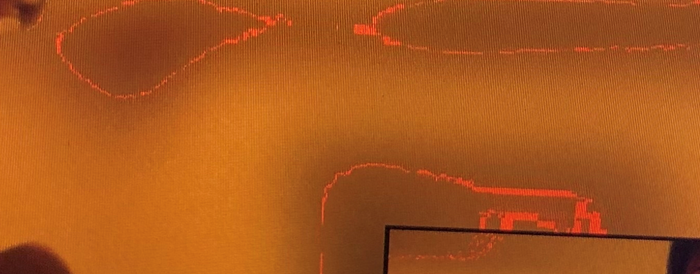
    Red Screen Artifacts When flux is on

    Scheduled Pinned Locked Moved Windows v4
    82 Posts 38 Posters 72.6k Views 40 Watching
    Loading More Posts
    • Oldest to Newest
    • Newest to Oldest
    • Most Votes
    Reply
    • Reply as topic
    Log in to reply
    This topic has been deleted. Only users with topic management privileges can see it.
    • M
      Mathieu @Mathieu
      last edited by Mathieu

      @Mathieu And for what it's worth, I upgraded Windows 10 from 1909 to 20H2, but it doesn't fix the bug either, still with f.lux 4.119 / latest Intel drivers.

      herfH 1 Reply Last reply
      Reply Quote 1
      • herfH
        herf
        last edited by

        Sent some emails to people for followup...

        1 Reply Last reply
        Reply Quote 0
        • F
          flow041
          last edited by

          Hi,

          I use flux from a long time. It's a good software. But, I have the same problem with my news laptop Lenovo Idepad with Intel iris graphic.

          I had before another lenovo ideapad not being on intel iris is I did not have this problem ...

          My windows i'ts a clean install (not pre-installed windows). All my driver are up to date. Windows 10 20H2.

          I hope this problem can be corrected ...

          PS: Sorry for my little English.

          Thanks for your job !

          1 Reply Last reply
          Reply Quote 0
          • C
            CW1987
            last edited by CW1987

            Same thing happening to me. Brand new XPS13, have used F.lux for years. But only happening on movie mode!!

            1 Reply Last reply
            Reply Quote 0
            • J
              jcaplan916
              last edited by jcaplan916

              I have the same problem - is there a known solution?

              ![0_1622128602206_Screenshot 2021-05-27 111432.png](Uploading 100%) ![0_1622128612512_Screenshot 2021-05-27 111432.png](Uploading 100%)

              1 Reply Last reply
              Reply Quote 0
              • herfH
                herf
                last edited by

                Thanks - there are apparently issues with the new Intel GPUs, and I guess we are first to hear about it.

                Can you post f.lux options > driver info here and we'll try to forward to the right people?

                J 2 Replies Last reply
                Reply Quote 0
                • J
                  jcaplan916 @herf
                  last edited by

                  @herf

                  Intel Corporation 27.20.100.9320: Intel(R) Iris(R) Xe Graphics (20210407)

                  Wide viewing angle & High density FlexView Display 3840x2400, 302 x 188mm, built 2020
                  Chromaticities:
                  R=0.680664 0.315430
                  G=0.259766 0.684570
                  B=0.146484 0.055664
                  W=0.312500 0.328125
                  sRGB gamut: 100%, AdobeRGB gamut: 85%

                  Generic PnP Monitor, 597 x 336mm, built 2015
                  Chromaticities:
                  R=0.661133 0.332031
                  G=0.301758 0.613281
                  B=0.149414 0.059570
                  W=0.313477 0.329102
                  sRGB gamut: 100%, AdobeRGB gamut: 69%

                  Winlimit=0, 1
                  Monitor 1 on Intel(R) Iris(R) Xe Graphics: VCGT=0 gamma=1

                  Windows Build: 19042.985

                  1 Reply Last reply
                  Reply Quote 0
                  • B
                    bangroad
                    last edited by

                    I am getting the pink artifacts on my new Intel NUC. Driver info:

                    Intel Corporation 27.20.100.8935: Intel(R) Iris(R) Xe Graphics (20201028)

                    Winlimit=0, 1
                    Monitor 1 on Intel(R) Iris(R) Xe Graphics: VCGT=0 gamma=1

                    Windows Build: 21390.1

                    1 Reply Last reply
                    Reply Quote 0
                    • J
                      jcaplan916 @herf
                      last edited by

                      @herf Just wondering if there is a known solution?

                      1 Reply Last reply
                      Reply Quote 0
                      • herfH
                        herf
                        last edited by

                        This thread is getting long - we have fixed several issues up above.

                        What I think is remaining is the Intel Xe color artifacts, so two things:

                        1. Can anyone post a photo of the screen?
                        2. Can you install the "Intel Graphics Command Center" (Windows Store) and see if the color settings tell us anything?
                        1 Reply Last reply
                        Reply Quote 0
                        • herfH
                          herf
                          last edited by

                          For everyone waiting patiently on the Intel Xe fix, I believe we have found & fixed it. Please try this version:

                          https://forum.justgetflux.com/topic/7942/v4-120-update-june-2021

                          ? 1 Reply Last reply
                          Reply Quote 0
                          • B
                            bergeboonp60
                            last edited by

                            Hello, yesterday, while fulfilling my work obligations for time tracking software, I got the same blue line, I don’t understand why.

                            1 Reply Last reply
                            Reply Quote 0
                            • ?
                              A Former User @herf
                              last edited by

                              @herf I'm using 4.120 and using Intel Iris Xe. Unfortunately I continue to see artifacts, in particular when watching YouTube videos. Currently on Graphics Driver version 27.20.100.9126, the latest from my OEM (HP).

                              1 Reply Last reply
                              Reply Quote 0
                              • herfH
                                herf
                                last edited by

                                Hi @planet can you post f.lux options > driver info?

                                1 Reply Last reply
                                Reply Quote 0
                                • ?
                                  A Former User
                                  last edited by

                                  Sure @herf, here is what is shown:

                                  Intel Corporation 27.20.100.9126: Intel(R) Iris(R) Xe Graphics (20201223)
                                  
                                  Generic PnP Monitor, 309 x 174mm, built 2019
                                  Chromaticities: 
                                    R=0.589844 0.349609
                                    G=0.330078 0.554688
                                    B=0.153320 0.119141
                                    W=0.313477 0.329102
                                    sRGB gamut: 63%, AdobeRGB gamut: 40%
                                  
                                  Unlimited gamma ramp=1, Internal ramp=0
                                  Monitor 1 on Intel(R) Iris(R) Xe Graphics
                                    Has VCGT profile=0, Gamma Ramp works=1
                                  
                                  Windows Build: 19043.1110
                                  
                                  1 Reply Last reply
                                  Reply Quote 0
                                  • G
                                    GH_RSC
                                    last edited by

                                    This post is deleted!
                                    1 Reply Last reply
                                    Reply Quote 0
                                    • G
                                      GH_RSC
                                      last edited by

                                      Hello, image.png

                                      Please can you help me resolve an issue for one of our users.

                                      They have reported that when using the colour labelled as 'incandescent' (2700 K) lines appear (The 'halogen' (setting at 3400K) does not seem to see the red lines).

                                      We have updated the laptop video drivers, confirmed the issue occurs if the laptop is unplugged for all other devices, and tried Display Settings > Night light > Night light settings > toggle on and off.

                                      The issue is seen on laptop screen and monitors connected.

                                      It is a new Lenovo X13 laptop.

                                      We have tried the latest version of the software.

                                      1 Reply Last reply
                                      Reply Quote 0
                                      • herfH
                                        herf @Mathieu
                                        last edited by

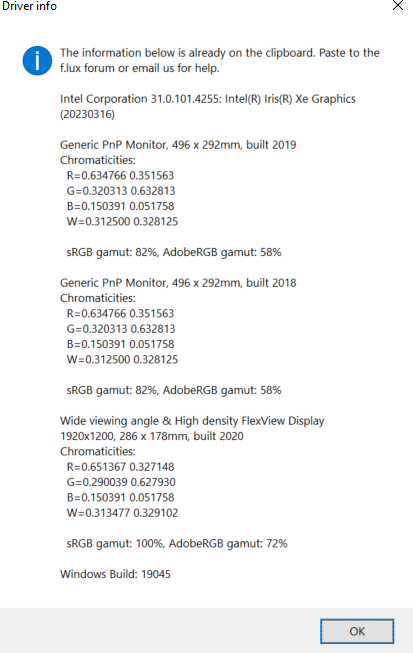
                                        @Mathieu can you post f.lux options > driver info?

                                        G 1 Reply Last reply
                                        Reply Quote 0
                                        • G
                                          GH_RSC @herf
                                          last edited by

                                          @herf image (1).png

                                          herfH 1 Reply Last reply
                                          Reply Quote 0
                                          • herfH
                                            herf @GH_RSC
                                            last edited by

                                            @GH_RSC can you try updating f.lux? This one seems pretty old and we did fix a bug like this a couple years ago.

                                            G 1 Reply Last reply
                                            Reply Quote 0

                                            Hello! It looks like you're interested in this conversation, but you don't have an account yet.

                                            Getting fed up of having to scroll through the same posts each visit? When you register for an account, you'll always come back to exactly where you were before, and choose to be notified of new replies (either via email, or push notification). You'll also be able to save bookmarks and upvote posts to show your appreciation to other community members.

                                            With your input, this post could be even better 💗

                                            Register Login
                                            • First post
                                              Last post
                                            Copyright © 2014 NodeBB Forums | Contributors