f.lux f.lux forum
    • Recent
    • Popular
    • Register
    • Login

    Red Screen Artifacts When flux is on

    Scheduled Pinned Locked Moved Windows v4
    82 Posts 38 Posters 72.6k Views 40 Watching
    Loading More Posts
    • Oldest to Newest
    • Newest to Oldest
    • Most Votes
    Reply
    • Reply as topic
    Log in to reply
    This topic has been deleted. Only users with topic management privileges can see it.
    • ?
      A Former User @herf
      last edited by

      @herf I'm using 4.120 and using Intel Iris Xe. Unfortunately I continue to see artifacts, in particular when watching YouTube videos. Currently on Graphics Driver version 27.20.100.9126, the latest from my OEM (HP).

      1 Reply Last reply
      Reply Quote 0
      • herfH
        herf
        last edited by

        Hi @planet can you post f.lux options > driver info?

        1 Reply Last reply
        Reply Quote 0
        • ?
          A Former User
          last edited by

          Sure @herf, here is what is shown:

          Intel Corporation 27.20.100.9126: Intel(R) Iris(R) Xe Graphics (20201223)
          
          Generic PnP Monitor, 309 x 174mm, built 2019
          Chromaticities: 
            R=0.589844 0.349609
            G=0.330078 0.554688
            B=0.153320 0.119141
            W=0.313477 0.329102
            sRGB gamut: 63%, AdobeRGB gamut: 40%
          
          Unlimited gamma ramp=1, Internal ramp=0
          Monitor 1 on Intel(R) Iris(R) Xe Graphics
            Has VCGT profile=0, Gamma Ramp works=1
          
          Windows Build: 19043.1110
          
          1 Reply Last reply
          Reply Quote 0
          • G
            GH_RSC
            last edited by

            This post is deleted!
            1 Reply Last reply
            Reply Quote 0
            • G
              GH_RSC
              last edited by

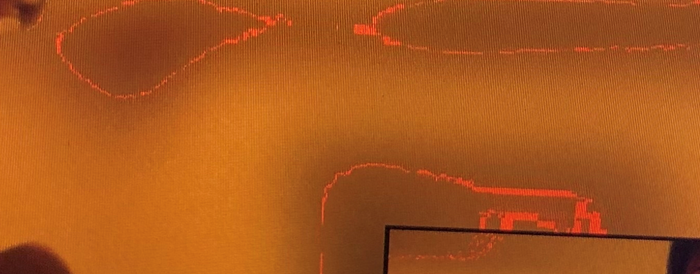
              Hello, image.png

              Please can you help me resolve an issue for one of our users.

              They have reported that when using the colour labelled as 'incandescent' (2700 K) lines appear (The 'halogen' (setting at 3400K) does not seem to see the red lines).

              We have updated the laptop video drivers, confirmed the issue occurs if the laptop is unplugged for all other devices, and tried Display Settings > Night light > Night light settings > toggle on and off.

              The issue is seen on laptop screen and monitors connected.

              It is a new Lenovo X13 laptop.

              We have tried the latest version of the software.

              1 Reply Last reply
              Reply Quote 0
              • herfH
                herf @Mathieu
                last edited by

                @Mathieu can you post f.lux options > driver info?

                G 1 Reply Last reply
                Reply Quote 0
                • G
                  GH_RSC @herf
                  last edited by

                  @herf image (1).png

                  herfH 1 Reply Last reply
                  Reply Quote 0
                  • herfH
                    herf @GH_RSC
                    last edited by

                    @GH_RSC can you try updating f.lux? This one seems pretty old and we did fix a bug like this a couple years ago.

                    G 1 Reply Last reply
                    Reply Quote 0
                    • G
                      GH_RSC @herf
                      last edited by

                      @herf

                      Thanks for your help, updating the client has resolved, however it has installed to the user profile (appdata \ local).

                      Are you able to provide a corporate version (Royal Society of Chemistry).

                      Many thanks
                      Greg

                      herfH 1 Reply Last reply
                      Reply Quote 0
                      • herfH
                        herf @GH_RSC
                        last edited by

                        @GH_RSC Hi Greg, our corporate build is up to date, and it now deactivates on uninstall. Please visit https://justgetflux.com/checkout/ and you can download a new version.

                        1 Reply Last reply
                        Reply Quote 0
                        • V
                          vimalzubaa
                          last edited by

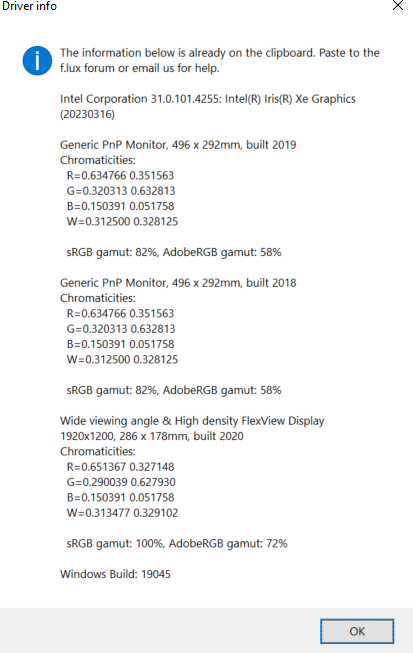
                          I just tested with different combinations. With only 3 monitors connected, I can't reproduce the artifacts at all.

                          1 Reply Last reply
                          Reply Quote 0

                          Hello! It looks like you're interested in this conversation, but you don't have an account yet.

                          Getting fed up of having to scroll through the same posts each visit? When you register for an account, you'll always come back to exactly where you were before, and choose to be notified of new replies (either via email, or push notification). You'll also be able to save bookmarks and upvote posts to show your appreciation to other community members.

                          With your input, this post could be even better 💗

                          Register Login
                          • First post
                            Last post
                          Copyright © 2014 NodeBB Forums | Contributors