F.lux stopped working after clearing caches folder
-
Somewhere in this forum, there is a thread about locked color profiles in 10.13 - basically any "non-display" profile (like the one called "sRGB") seemed to make the color system fail and disallowed switching away from it, which made all kinds of things fail. I recall people worked around it by moving the files away and then back, but I also thought it had been fixed a few months ago.
-
That's very interesting, thanks for mentioning that. I will try to find the posts you're referring to.
-
@Sisyphus-Hektor looks like maybe here: https://forum.justgetflux.com/topic/4184/f-lux-not-supported-in-macos-high-sierra/26
-
@herf I'm having the same issue as @mfield had in that my display is stuck on sRGB and the corresponding .icc file found at /System/Library/ColorSync/Profiles/sRGB Profile.icc can neither be moved nor deleted.
Now that I have a better idea of what's going on, I will browse around the web for a solution. I will post here if I find anything.
-
@herf Just to be clear that when I say my display is stuck on sRGB, I mean two things: 1) whichever new color profile I choose, it makes no difference on my screen; 2) my new choice isn't saved so the next time I open system preferences, I still get sRGB.
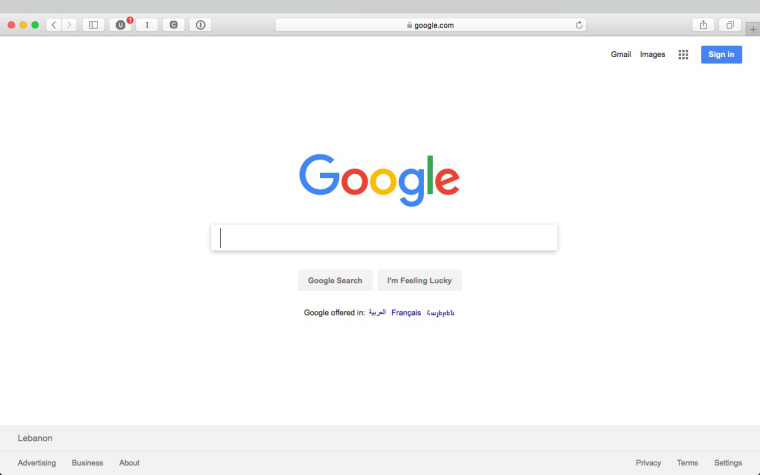
To make sure we're all on the same page here, I've uploaded a Safari screenshot to show you what I mean by a "blue tint."
Is it me or is this blue tint murder to the eyes?
-
In the other thread people thought it had cleared up as of 10.13.3 and 10.13.4. Apparently that's not true.
I don't have any more knowledge about it, other than this bug seems to break color calibration generally in macOS, and it is not really f.lux-specific (it just affects f.lux because we are the most noticeable color calibration change).
-
Yes I know @herf. Thanks for helping out despite this not being a F.lux-specific issue. I'll contact Apple support again on the off-chance a more knowledgeable technician might have a few useful tricks up their sleeve.
Will post back here if I hit jackpot.
-
Don't suppose you hit that jackpot? Seem to have the exact same problem and none of the suggested solutions I've found so far have worked, including deleting the sRGB profile. Have a blue tint and F.lux doesn't change the display at all.
-
If anyone else ever encounters this problem, the only solution that worked for me was to re-download and reinstall High Sierra, which reinstated the correct display colour profile and both removed the blue tint that had taken over the display and allowed F.lux to work again.
-
I have the same situation. I haven't figured it out yet.

Hello! It looks like you're interested in this conversation, but you don't have an account yet.
Getting fed up of having to scroll through the same posts each visit? When you register for an account, you'll always come back to exactly where you were before, and choose to be notified of new replies (either via email, or push notification). You'll also be able to save bookmarks and upvote posts to show your appreciation to other community members.
With your input, this post could be even better 💗
Register Login