Windows May 2020 (2004) Dimming no longer works
-
Flux v 4.115. Using the dimming shortcuts (Alt+PgUp/PgDown) Only dims the screen for a few seconds after the application starts. But anything more than a couple seconds after starting flux, and the screen no longer dims/brightens. Issue persists after restarts.
-
Thanks for the report.
Can you post f.lux options > driver info?
-
@herf said in Windows May 2020 (2004) Dimming no longer works:
Thanks for the report.
Can you post f.lux options > driver info?
Same issue here. Here's the driver info output:
NVIDIA 26.21.14.4614: NVIDIA GeForce GTX 1080 (20200515) Citrix Systems Inc. 12.40.44.247: Citrix Indirect Display Adapter (20190123) Dell U2312HM (Digital - DisplayPort), 510 x 287mm, built 2013 Chromaticities: R=0.637695 0.330078 G=0.311523 0.623047 B=0.150391 0.068359 W=0.313477 0.329102 sRGB gamut: 99%, AdobeRGB gamut: 68% Dell U2312HM (Digital - DisplayPort), 510 x 287mm, built 2013 Chromaticities: R=0.639648 0.333008 G=0.311523 0.625977 B=0.153320 0.070313 W=0.313477 0.329102 sRGB gamut: 99%, AdobeRGB gamut: 69% Winlimit=0, 0 Monitor 1 on NVIDIA GeForce GTX 1080: VCGT=0 gamma=1 Monitor 2 on NVIDIA GeForce GTX 1080: VCGT=0 gamma=1 Windows Build: 19041.329 -
Do you have an automatic brightness feature on your machine?
In 4.116, we are adding an advanced option to use the "internal" color controls - previously we were forcing it on, but we're trying to stop doing that. So you can see if that fixes it....but mainly I would like to find out what is conflicting instead.
-
See "Always use Windows internal color table" here - but still, I want to figure out what's going wrong first :)
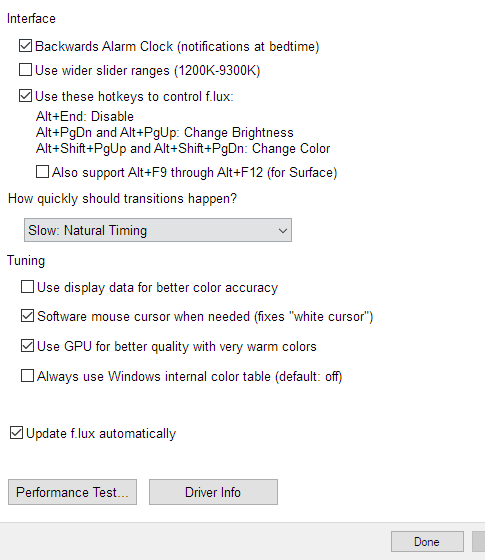
-
@herf said in Windows May 2020 (2004) Dimming no longer works:
Do you have an automatic brightness feature on your machine?
In 4.116, we are adding an advanced option to use the "internal" color controls - previously we were forcing it on, but we're trying to stop doing that. So you can see if that fixes it....but mainly I would like to find out what is conflicting instead.
I do not. It's a desktop machine so f.lux is my only brightness control.
Just updated to 4.116 and flipped that option on, which seems to have fixed it 👍

Hello! It looks like you're interested in this conversation, but you don't have an account yet.
Getting fed up of having to scroll through the same posts each visit? When you register for an account, you'll always come back to exactly where you were before, and choose to be notified of new replies (either via email, or push notification). You'll also be able to save bookmarks and upvote posts to show your appreciation to other community members.
With your input, this post could be even better 💗
Register Login