f.lux f.lux forum
    • Recent
    • Popular
    • Register
    • Login

    yellow tint persists and the tips form the forum dont work at all

    Scheduled Pinned Locked Moved Windows v4
    14 Posts 6 Posters 3.3k Views 6 Watching
    Loading More Posts
    • Oldest to Newest
    • Newest to Oldest
    • Most Votes
    Reply
    • Reply as topic
    Log in to reply
    This topic has been deleted. Only users with topic management privileges can see it.
    • P
      pator_r
      last edited by

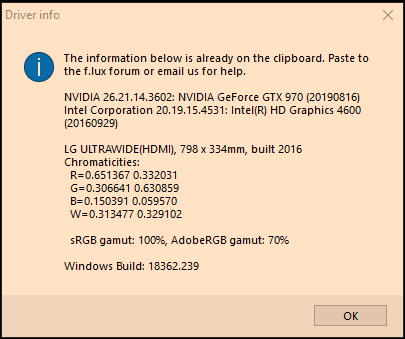
      Hello, i have the same problem
      0_1567555576489_fcbea8cd-7b43-4f98-adf5-eb4762cf74e0-image.png
      Windows 10 OS version: 18362.239 (1903)

      herfH 1 Reply Last reply
      Reply Quote 0
      • herfH
        herf @pator_r
        last edited by

        @pator_r Can you try 4.111 from the main website? We are working on small adjustments to workaround bugs in the OS, and some people got an update that was too aggressive. (We are rolling updates slowly so we can check that everything works.)

        P 1 Reply Last reply
        Reply Quote 0
        • P
          pator_r @herf
          last edited by

          @herf It's already 4.111, this problem started after I formatted my PC. NVIDIA drivers it's already in the last version too.

          herfH 1 Reply Last reply
          Reply Quote 0
          • herfH
            herf @pator_r
            last edited by

            @pator_r Can you look for an upgrade to the Intel GPU driver? In most cases, discrete GPUs use the built-in one to display 2-D, so an older driver (2016) has caused problems similar to this in the past.

            P 1 Reply Last reply
            Reply Quote 0
            • P
              pator_r @herf
              last edited by

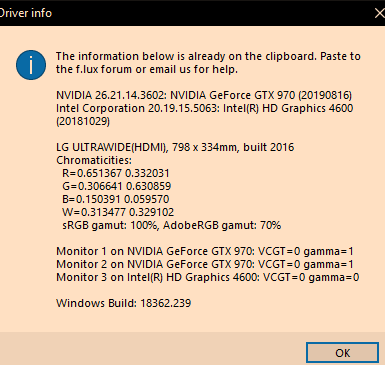
              @herf Still the same :/
              0_1567650625874_66ed444a-5444-4c08-90c5-d21860182107-image.png

              herfH 1 Reply Last reply
              Reply Quote 0
              • TwoCablesT
                TwoCables
                last edited by

                Is it caused by the Windows feature called Night Light?

                P 1 Reply Last reply
                Reply Quote 0
                • herfH
                  herf @pator_r
                  last edited by

                  @pator_r I have a very similar configuration but with nothing plugged into the integrated Intel chipset (which is what is failing here) - will check it out and see.

                  P 1 Reply Last reply
                  Reply Quote 1
                  • P
                    pator_r @TwoCables
                    last edited by

                    @twocables No, with the Night Light from Windows keeps normal
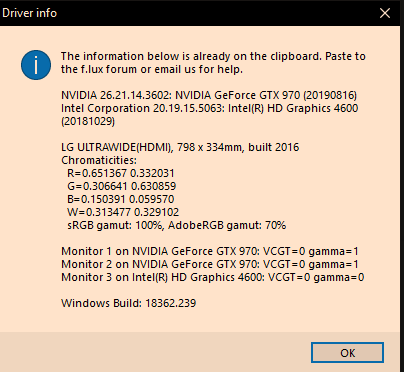
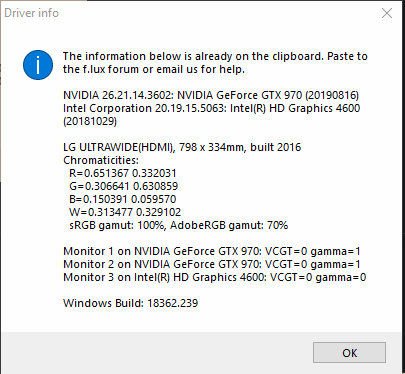
                    0_1567724105302_16e8613b-8f22-4526-84d6-9e50b72d9f62-image.png
                    0_1567724147971_9e3e7e69-6a08-4101-ac79-fa3ecfa6f201-image.png

                    1 Reply Last reply
                    Reply Quote 0
                    • P
                      pator_r @herf
                      last edited by pator_r

                      @herf Thanks a lot for the patience!! But nothing works for me, sad, i ill try clean windows again

                      1 Reply Last reply
                      Reply Quote 0
                      • P
                        pator_r
                        last edited by

                        @pator_r @herf Oh wait, i realized that my TV, which was plugged on the motherboard, even unplugged it was still active on windows (???), i disabled it and now works. Thanks for the tip and for the patience

                        1 Reply Last reply
                        Reply Quote 1
                        • R
                          romans9
                          last edited by

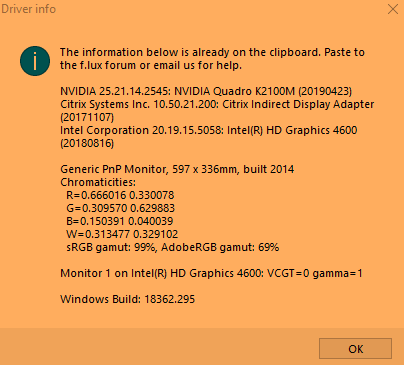
                          Having this problem myself still: alt text

                          Flux v4.111

                          Disabled Lenovo Vantage Eye Care, etc.

                          1 Reply Last reply
                          Reply Quote 0
                          • V
                            Vladimir @usedtobeafan
                            last edited by

                            @usedtobeafan I have a LENOVO laptop, and this fixed my issue definitely.

                            It works not only for Snagit, but also for Snipping tool....

                            https://forums.lenovo.com/t5/ThinkPad-X-Series-Laptops/Snipping-Tool-Has-Orange-Tint-Now/m-p/4519494/highlight/true#M104764

                            I did first look at this solution, but it didn't help me:
                            https://support.techsmith.com/hc/en-us/articles/360027625811-Snagit-Windows-Yellow-Tint-in-Captures-from-f-lux


                            1 Reply Last reply
                            Reply Quote 0

                            Hello! It looks like you're interested in this conversation, but you don't have an account yet.

                            Getting fed up of having to scroll through the same posts each visit? When you register for an account, you'll always come back to exactly where you were before, and choose to be notified of new replies (either via email, or push notification). You'll also be able to save bookmarks and upvote posts to show your appreciation to other community members.

                            With your input, this post could be even better 💗

                            Register Login
                            • First post
                              Last post
                            Copyright © 2014 NodeBB Forums | Contributors