Intense blue flickering (MBA, '13, El Capitan)
-
same here!
-
Two things to try: turning off the Displays Automatic Brightness setting, and try rebooting (with no external monitors connected).
-
We'll check out 10.11.2.
-
We'll call this the "auto brightness bug".
We have these configs in-house, and here is what we are seeing after a fresh boot:
-
2012 MBA on 10.11.2: no flashing whether or not Automatically Adjust Brightness is enabled
-
2013 MBA on 10.11.1: yes, flashing when Auto Brightness is enabled, otherwise no.
-
2014 MBPr on 10.11.1: no flashing at all (either video card), whether or not Auto Brightness is enabled. This version is also using a custom profile because it's dual GPU.
We see best results after a clean boot with no external devices attached.
When we've seen bugs, it has been with external display (Thunderbolt 27) or after a lot of wake/sleeps/etc.Sounds like other people are seeing this more constantly, so any other steps you can think of would help a lot.
-
-
This is really easy to reproduce by covering the camera (with my hand) at night; the screen will instantly turn blue. Then I can make it red again by hitting the melanopic light refresh button in the about box.
Only happens on mid '13 MBA. My mid '15 MBP is not affected.
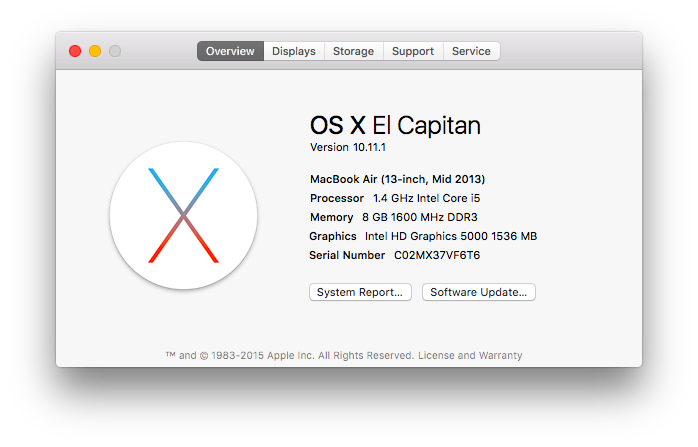
-
Yes this is related to Apple's new "auto brightness" feature which also adjusts midtones in bright rooms.
And it definitely happens on our MBA with auto-brightness "on" in settings, and it goes away otherwise (may take a reboot also?)
-
I've just installed the 36.5 version, and seems that the bug is solved.
Thanks!

-
@lpuerto Damn! It returned! (the flickering)
-
The ones with 10.11.2... have you reported it to apple? Seems that it's also an apple problem :)
-
Since there are two reports of MacBook Pros not being affected, I'll add that my Mid-2014 Retina Macbook Pro running 10.11.1 IS affected. It has integrated graphics only.
-
Yes in the newer betas we are seeing it anytime the Automatic Brightness feature is on (or when it's recently been turned off).
-
I am on the same setup, and with the same problem. It was so annoying I quit flux. But that was even more annoying.
I disabled "Automatically adjust Brightness" in Display prefs and sofar sogood.
OSX 10.11.1
MacBook Air (13-inch, Mid 2013) -
Is there anything that can cause it to re-enable itself? I could've sworn I'd disabled that, but I looked again and it was enabled. Just disabled it and no flickering (so far).
FWIW I'm on a Late 2013 13" MBPr with 10.11.1.
-
@whatismyusername that's frightening! did you reboot?
-
@lorna Sorry, just remembered it was the "Adjust keyboard brightness in low light" setting I had disabled. False alarm.
-
Wow, I didn't even know that was a thing now, ha. Whew.



Hello! It looks like you're interested in this conversation, but you don't have an account yet.
Getting fed up of having to scroll through the same posts each visit? When you register for an account, you'll always come back to exactly where you were before, and choose to be notified of new replies (either via email, or push notification). You'll also be able to save bookmarks and upvote posts to show your appreciation to other community members.
With your input, this post could be even better 💗
Register Login