Screen capture tools obtain the maximum warmth
-
Same issue here - using a Dell Latitude with DisplayLink dock with multiple monitors. Happens with Snipping Tool and also by pressing the Print Screen key and pasting into Paint.
-
For what it's worth, there is a workaround if you do screenshots of web pages specifically. Firefox Quantum has a nice contextual "Take a screenshot" feature that seems to be using a different approach to screenshots and does not need f.lux to be disabled.
-
@auching Yes - f.lux didn't work with USB-connected displays at all before.
-
Made a thread to document this all at once:
https://forum.justgetflux.com/topic/4653/tinted-screenshots-or-games-missing-f-lux -
@herf I checked and mine isn't use DisplayLink screen. and this didn't happen before last major update.
-
@auching many docking stations use DisplayLink internally. suggest checking device manager to see if you have a driver like this, because it can be fixed with the new driver + registry
-
@herf Yes, I checked device manager and there are no DisplayLink in the list
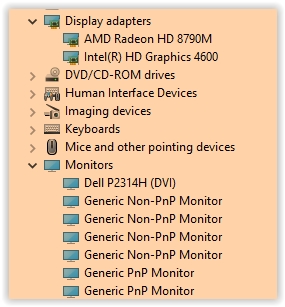
-
@auching This is also why I linked to the thread here, which suggests unlocking your color range and rebooting - unrelated to DisplayLink:
https://forum.justgetflux.com/topic/4653/tinted-screenshots-or-games-missing-f-lux
-
Sorry to awaken this two year old thread... but i’m Actually trying to get flux to appear on a screen recording. I want to record a video the way it appears with the darkroom filter on, but it doesn’t appear when I attempt a screen capture. What is a good way to get this to appear?
Thanks,
Spencer -
Same here (7 years later)
When an additional monitor is connected (USB > Dock > HDMI), I got the same issue. -
@guillaume1978 this is because the dock does not provide traditional color controls, so f.lux has to emulate them using the GPU.
If the dock happens to be a DisplayLink one, you can sometimes add these controls back using the registry: https://support.displaylink.com/knowledgebase/articles/1886413-how-to-enable-night-light-or-f-lux-on-displaylink

Hello! It looks like you're interested in this conversation, but you don't have an account yet.
Getting fed up of having to scroll through the same posts each visit? When you register for an account, you'll always come back to exactly where you were before, and choose to be notified of new replies (either via email, or push notification). You'll also be able to save bookmarks and upvote posts to show your appreciation to other community members.
With your input, this post could be even better 💗
Register Login