f.lux f.lux forum
    • Recent
    • Popular
    • Register
    • Login

    Screen capture tools obtain the maximum warmth

    Windows v4
    screenshot warmth issue
    6
    19
    17.1k
    Loading More Posts
    • Oldest to Newest
    • Newest to Oldest
    • Most Votes
    Reply
    • Reply as topic
    Log in to reply
    This topic has been deleted. Only users with topic management privileges can see it.
    • S
      Sbudz
      last edited by

      For what it's worth, there is a workaround if you do screenshots of web pages specifically. Firefox Quantum has a nice contextual "Take a screenshot" feature that seems to be using a different approach to screenshots and does not need f.lux to be disabled.

      1 Reply Last reply Reply Quote 0
      • herfH
        herf @auching
        last edited by

        @auching Yes - f.lux didn't work with USB-connected displays at all before.

        A 1 Reply Last reply Reply Quote 1
        • herfH
          herf
          last edited by

          Made a thread to document this all at once:
          https://forum.justgetflux.com/topic/4653/tinted-screenshots-or-games-missing-f-lux

          1 Reply Last reply Reply Quote 0
          • A
            auching @herf
            last edited by

            @herf I checked and mine isn't use DisplayLink screen. and this didn't happen before last major update.

            herfH 1 Reply Last reply Reply Quote 0
            • herfH
              herf @auching
              last edited by

              @auching many docking stations use DisplayLink internally. suggest checking device manager to see if you have a driver like this, because it can be fixed with the new driver + registry

              A 1 Reply Last reply Reply Quote 0
              • A
                auching @herf
                last edited by

                @herf Yes, I checked device manager and there are no DisplayLink in the list
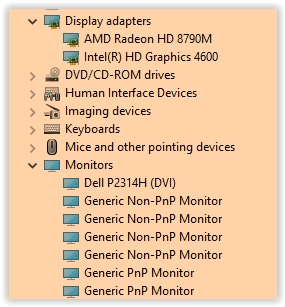
                0_1513001178923_Screen Shot 12-11-17 at 08.03 AM.JPG

                herfH 1 Reply Last reply Reply Quote 0
                • herfH
                  herf @auching
                  last edited by

                  @auching This is also why I linked to the thread here, which suggests unlocking your color range and rebooting - unrelated to DisplayLink:

                  https://forum.justgetflux.com/topic/4653/tinted-screenshots-or-games-missing-f-lux

                  1 Reply Last reply Reply Quote 0
                  • S
                    sps443
                    last edited by

                    Sorry to awaken this two year old thread... but i’m Actually trying to get flux to appear on a screen recording. I want to record a video the way it appears with the darkroom filter on, but it doesn’t appear when I attempt a screen capture. What is a good way to get this to appear?

                    Thanks,
                    Spencer

                    1 Reply Last reply Reply Quote 0
                    • G
                      guillaume1978
                      last edited by

                      Same here (7 years later)
                      When an additional monitor is connected (USB > Dock > HDMI), I got the same issue.

                      herfH 1 Reply Last reply Reply Quote 0
                      • herfH
                        herf @guillaume1978
                        last edited by

                        @guillaume1978 this is because the dock does not provide traditional color controls, so f.lux has to emulate them using the GPU.

                        If the dock happens to be a DisplayLink one, you can sometimes add these controls back using the registry: https://support.displaylink.com/knowledgebase/articles/1886413-how-to-enable-night-light-or-f-lux-on-displaylink

                        1 Reply Last reply Reply Quote 0
                        • First post
                          Last post
                        Copyright © 2014 NodeBB Forums | Contributors