Disabled when using RDP Session
-
When I RDP into a computer I am getting the "Disabled (remote desktop)" error. Looked though the forums and not seeing a way to fix this or a way that works for me. Any help would be greatly appreciated.
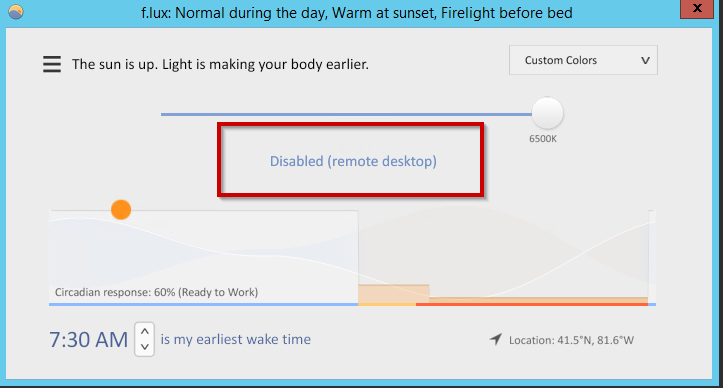
-
We will think about how to add an option for this - the intent is to prevent f.lux from running on the client and the terminal server (twice).
Just to confirm: are you not able to run f.lux on the client?
-
I can install it on the clients session with no issue. It does not affect other users sessions. I am able to open the program (shown above) and as long as my mouse is on the slide bar it does dim on the RDP only, but as soon as I let go of the mouse (holding left click to drag it) it goes back to normal brightness. Again this is for RDP only. I can actually get it to work when I remote in using Teamviewer, anydesk, logmein and splashtop. However this is not an option for the user logging in RDP.
-
Hi @herf
I actually have been looking for a toggle for this! I often remote into my work computer from my phone in the middle of the night (such as now). If it is a simple support call, instead of getting out of bed and waking the wife and dogs up, I just remote using my iPhone. Though I have 'night shift' on, I would like to control the brightness/color more using flu.x, so I can hopefully fall asleep faster after a 10 minute fix!
Thanks!
-
Hi,
This feature would be greatly appreciated for me also.
I access my computer from Remina (RDP) installed on a completely locked Raspberry (no rights).
So client install is not an option.Thanks you so much !

Hello! It looks like you're interested in this conversation, but you don't have an account yet.
Getting fed up of having to scroll through the same posts each visit? When you register for an account, you'll always come back to exactly where you were before, and choose to be notified of new replies (either via email, or push notification). You'll also be able to save bookmarks and upvote posts to show your appreciation to other community members.
With your input, this post could be even better 💗
Register Login