f.lux f.lux forum
    • Recent
    • Popular
    • Register
    • Login

    Can't get into software menu

    Scheduled Pinned Locked Moved macOS
    8 Posts 3 Posters 5.2k Views 2 Watching
    Loading More Posts
    • Oldest to Newest
    • Newest to Oldest
    • Most Votes
    Reply
    • Reply as topic
    Log in to reply
    This topic has been deleted. Only users with topic management privileges can see it.
    • R
      Richard101
      last edited by

      Hi, I'm on the latest version of Sierra, when I go into Finder, double click on f.lux or right click to get menu then 'open', I can't get into the software's menu? I'd like to change the settings. How may I do this?
      Thanks

      Tungsten_smoothT 1 Reply Last reply
      Reply Quote 0
      • Tungsten_smoothT
        Tungsten_smooth @Richard101
        last edited by

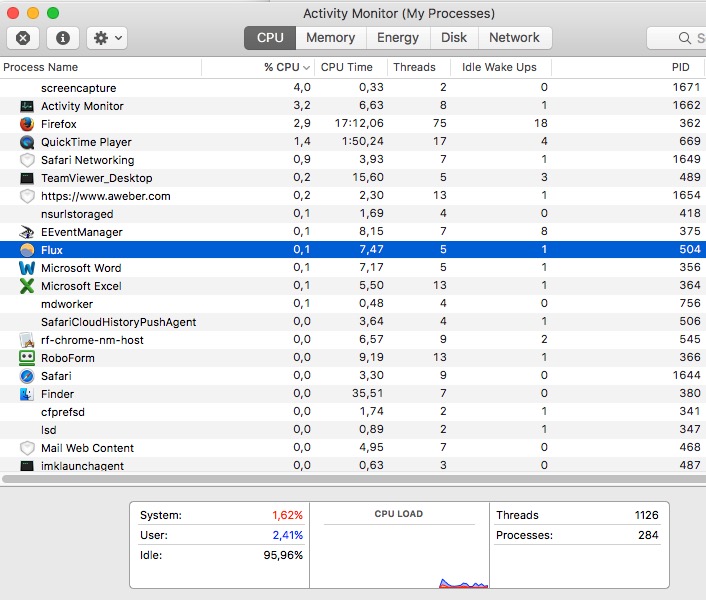
        @Richard101 Are you seeing an outline of the f.lux icon by your clock? Look for the flux process in the activity monitor on Mac.

        R 2 Replies Last reply
        Reply Quote 0
        • R
          Richard101 @Tungsten_smooth
          last edited by

          @Tungsten_smooth Thanks a lot for your reply. I'm not seeing the f.lux icon next to my clock 0_1501661966045_Screen Shot 2017-08-02 at 10.18.59.jpg but I can see flx in the activity monitor 0_1501661917665_Screen Shot 2017-08-02 at 10.14.27.jpg

          What do you suggest?

          1 Reply Last reply
          Reply Quote 0
          • R
            Richard101 @Tungsten_smooth
            last edited by

            @Tungsten_smooth I'm thinking a re-install would be best. But It won't let me delete f.lux in Finder because 'it's open'?

            Tungsten_smoothT 1 Reply Last reply
            Reply Quote 0
            • Tungsten_smoothT
              Tungsten_smooth @Richard101
              last edited by

              @Richard101 Stop the flux process and delete any folders / files for f.lux. Then reinstall.

              R 1 Reply Last reply
              Reply Quote 0
              • R
                Richard101 @Tungsten_smooth
                last edited by

                @Tungsten_smooth I managed to stop the f.lux processes using the Activity Monitor. Then I deleted the software. Then I re-installed but I still can't get in the menu. This must be an incompatibility issue with Sierra?

                1 Reply Last reply
                Reply Quote 0
                • herfH
                  herf
                  last edited by

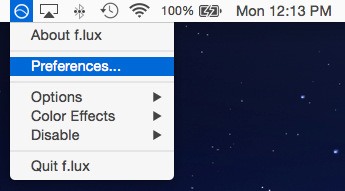
                  It should look like this:
                  alt text

                  If you're using an app with a lot of menu items (to the left) these icons can hide, but other than that I would expect it to be there!

                  R 1 Reply Last reply
                  Reply Quote 0
                  • R
                    Richard101 @herf
                    last edited by

                    @herf It's now there. Not sure why I wasn't seeing it before. Thanks a lot to all!

                    1 Reply Last reply
                    Reply Quote 0

                    Hello! It looks like you're interested in this conversation, but you don't have an account yet.

                    Getting fed up of having to scroll through the same posts each visit? When you register for an account, you'll always come back to exactly where you were before, and choose to be notified of new replies (either via email, or push notification). You'll also be able to save bookmarks and upvote posts to show your appreciation to other community members.

                    With your input, this post could be even better 💗

                    Register Login
                    • First post
                      Last post
                    Copyright © 2014 NodeBB Forums | Contributors