Unable to add application to exceptions ("disable when using...")
-
Greetings!
I've been using f.lux on a daily basis for many years and have quite a few applications in the exception list - mostly games and image editing software. I'm really grateful for this lightweight, eye-saving software masterpiece. So to the f.lux developers: thank you very much!
Recently, I started playing Where Winds Meet and ran into an issue: f.lux doesn’t detect the game application when I open the menu and select "Disable when using…". Instead of the game title, Windows "Search application" is shown there.
As I discovered using Process Explorer, the game's executable file doesn't have a correct image name, which seems to be the reason why f.lux can’t recognize it and add it properly to the list.
Just compare these two screenshots to see the issue: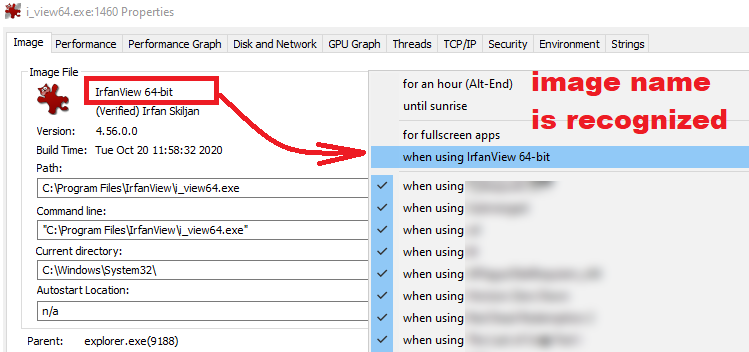
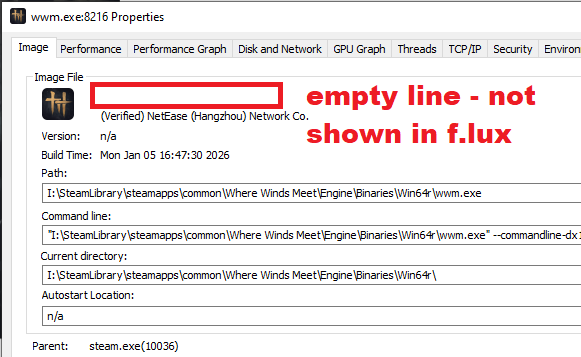
So I'd like to ask whether there are any workarounds to add the game manually.
P.S. I tried adding the .exe name and the application window title manually to the registry and restarting f.lux
(HKCU\SOFTWARE\Michael Herf\flux\Preferences\disabled), but neither helped. The item does appear in the exception list menu, but it doesn't actually work. I suspect that f.lux requires the image name specifically to detect that the application is running.