F.lux having different colors on different screens
-
Hello everyone,
I'm experiencing an issue with one of my monitors and hoping someone might have some insight.
Issue: One of the DisplayPort monitors is displaying higher levels of yellow compared to the others.
What I've Tried:- Ensured HDR is not enabled on the problematic monitor.
- Confirmed Night Light is disabled in Windows 10.
- Checked NVIDIA Control Panel settings: All settings match those of my main monitor.
- Ran the application as admin and ensured it's the latest version.
- Updated my GPU drivers to the latest version.
Despite these steps, the yellow tint persists on that one monitor. Has anyone else encountered a similar issue or have any suggestions on what else I might try to resolve this?
Thank you!
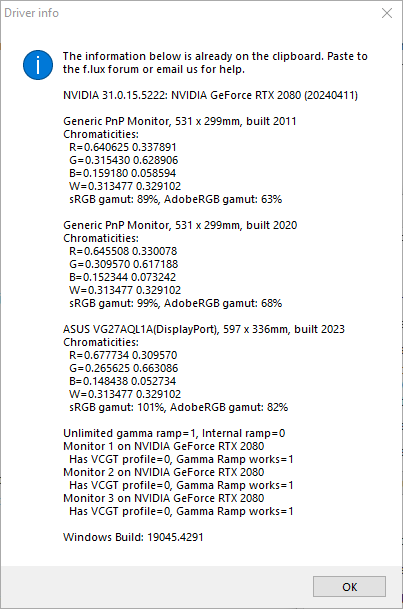
-
@Chikins thanks - yes we do try to fit to each monitor's "chromaticities" (the colors they use for R, G, and B) - assuming your new ASUS is a wider gamut display than the rest? For matching exactly you may need a color profile for each one.
This review has a profile you could try for the ASUS: https://www.rtings.com/monitor/reviews/asus/tuf-gaming-vg27aql1a
-
@herf Thanks for the reply! I forgot to mention that I already had the ICC profile installed for the ASUS monitor. I just double-checked and ensured it was set as the default profile, but the result remains the same. Does each monitor need to have one as well? Any other thoughts?
-
@Chikins the ones we read say "VCGT profile=1" so it is not a full profile in this case.

Hello! It looks like you're interested in this conversation, but you don't have an account yet.
Getting fed up of having to scroll through the same posts each visit? When you register for an account, you'll always come back to exactly where you were before, and choose to be notified of new replies (either via email, or push notification). You'll also be able to save bookmarks and upvote posts to show your appreciation to other community members.
With your input, this post could be even better 💗
Register Login