F.lux doesn't turn off in the morning
-
I just built a new pc and noticed that f.lux continues to run in the morning well past the schedule. If I open the "Change current color" screen, the daylight option is checked, but there's very clearly a tint. Disabling f.lux for an hour also does nothing. The only way I can clear it is by opening the display panel in the windows settings, at which point the tint immediately snaps off. I can't seem to find anyone else with this exact problem. Any ideas?
-
This has since fixed itself through no clear apparent action on my part, so I guess resolved for now.
-
Scratch the previous comment: this morning it happened again, so any help is appreciated.
-
Can you post f.lux options > driver info?
-
@herf sorry for the delay responding:
Intel Corporation 27.20.100.9415: Intel(R) UHD Graphics 730 (20210322)
Generic PnP Monitor, 531 x 298mm, built 2021
Chromaticities:
R=0.646484 0.330078
G=0.309570 0.617188
B=0.152344 0.073242
W=0.313477 0.329102
sRGB gamut: 99%, AdobeRGB gamut: 68%Winlimit=0, 0
Monitor 1 on Intel(R) UHD Graphics 730: VCGT=0 gamma=0Windows Build: 19042.928
-
It is saying there are not working gamma ramps (color controls) - do you think it is failing after the machine sleeps, or does it also happen if it is kept awake?
-
@herf Every night I put the pc to sleep, and when I wake it up that's when I have the issue--so I haven't yet seen this happen when the PC stays awake. I'll try that tonight, but I assume it's the former.
-
@herf it doesn't appear to happen when the pc stays awake. Is there anything I can do about these gamma ramps?
-
Yeah, if the "gamma=0" line changes after sleep that is a bad sign. I would suspect the driver is failing at standby.
Looks like there is an April release to the driver:
https://downloadcenter.intel.com/product/126790/Intel-UHD-Graphics-730If that doesn't work, I would try rolling back this driver and waiting for Intel to fix this before updating. To do that, try Device Manager > Display Adapters > Intel UHD... > Rollback
-
@herf Thanks for the help. It's still happening after installing this driver release, so I guess I'm just SOL right now. And this graphics driver is brand new, so I'm not sure there's even anything different to roll back to. (The newness probably is also part of the problem here.) Anyway, I'll check back in with Intel in a few weeks now that I know what the issue is. Appreciate it again!
-
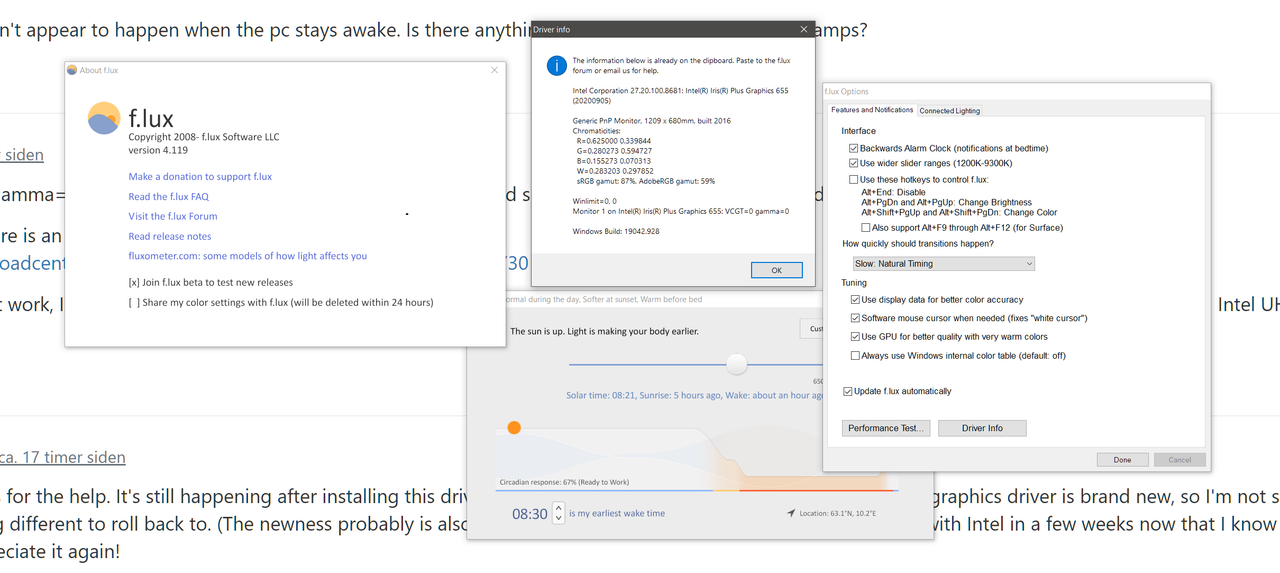
got the same thing here. Have to exit f.lux then restart it for daytime colour to return. Else it has a yellow tint.
-
@pietroi thanks - I have a UHD 620 on the exact same driver version and windows build (with no failures of course). Presumably the driver is failing shortly after wake and then working some time later.

Hello! It looks like you're interested in this conversation, but you don't have an account yet.
Getting fed up of having to scroll through the same posts each visit? When you register for an account, you'll always come back to exactly where you were before, and choose to be notified of new replies (either via email, or push notification). You'll also be able to save bookmarks and upvote posts to show your appreciation to other community members.
With your input, this post could be even better 💗
Register Login