Version 3 to 4 Upgrade
-
@timothyleary we defaulted to "slow" transitions in this version, so we do very gradual fades to simulate the path of the sun. If you want fast ones again, there is a menu in the "options" menu.
-
@Boogeyman I liked this too, but we ran into some problems where the app would create too many entries in the "notifications" list and it was causing some problems in Windows, so we couldn't keep shipping it that way. There are some more complicated ways to fix this but we didn't get them to work, so we keep the same tooltip all the time now. I'll keep looking at it and see if we can do better.
-
I really enjoyed knowing which version I have by just right-clicking the icon in the Notification Area. I think there's nothing wrong with keeping the version number there. I can agree though that it's better to say "Exit f.lux" instead of "Exit f.lux 4.48".
-
Hello,
In version 3, I liked that when holding the mouse on the f.lux taskbar icon, then a tooltip informed be about the sunset time. In version 4, the tooltip has only a message „fl.lux". Now I have to make extra click in order to see the previously mentioned information.
Any ways to get the V3 behaviour back? -
@Bushido yes it was no fun to take this out - it was causing problems with Windows "notifications" settings.... tons of dupicate entries. Hopefully we can figure out how to put it back.
-
I think "Getting sleepy?" could be changed to "F.lux is in Bedtime mode" (or something similar). So, I think it would be good for f.lux to report which mode its in instead of having a conversation with its user.
-
Hi,
I took some time to adjust to v4 changes before posting. I'm quite happy with it now (wasn't at first :)).
One thing i don't like is the lack of 1-click access (or hotkey) to my most commonly used options : Movie mode / darkroom mode / Vignette mode.
The other "color effects" seem pretty useless to me, and I even read somewhere on the forum that they are considered "demo effects". So why create a sub-category for demos and hide useful options in there ?One more word : Vignette mode is amazing, thank you !
It would be even better if it could detect where the text is and adjust accordingly, but it's already great. -
If I set the drop-down box on the right in v4.47 to "Classic f.lux", should it be the same as how it used to look (by default) in version 3(.12)? It's just that I updated to 4.47 a few days ago and something seems very different about my screen now when the sun sets compared to what it used to be like in the previous version.
Finding it all a bit confusing if I'm honest!
-
Here are two things that may have changed:
-
We are doing a slow transition by default - if you prefer the old one you can select it in the options menu under transition speed (=medium)
-
We are trying to match your monitor color more closely, but occasionally a monitor isn't cooperating. Again in the options menu, you can try unchecking "Use display data for better color accuracy"
-
-
Hello. I have a question regarding the new version of f.lux. On the old version, I used to use the color effect "reduce eyestrain". But now, I cannot find it anymore. How can I obtain the same effect? Thank you.
-
@Ady1989
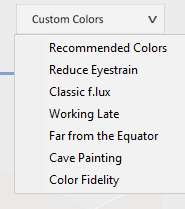 Click f.lux icon and then the drop-down menu on the upper right side.
-
@Bushido thank you. But, it will have the same effect, it will so the same thing? The "reduce eyestrain" effect used to change the color of my screen during the day. The one from that menu will do the same?
-
This post is deleted! -
@Bushido I don't think it has the same effect. The current one will stay permanently at 5900K. The previous one used to change this step by step, according to the sunlight. I don't want the color change that the program makes automatically. Maybe someone from f.lux may have a concrete answer.
-
It was renamed to "Soft White" because people were confused by having 2 settings of the same name that did 2 completely different things.
-
@TwoCables thank you. I will select the "soft white" effect and check during the dat if it has the same effect as the "reduce eyestrain" use to have. So the reduce eyestrain from the right menu what does it do?
-
@Ady1989 said in Version 3 to 4 Upgrade:
@TwoCables thank you. I will select the "soft white" effect and check during the dat if it has the same effect as the "reduce eyestrain" use to have. So the reduce eyestrain from the right menu what does it do?
Choosing "Soft White" changes the color immediately. It is the new name of the Color Effect called "Reduce Eyestrain". What it does has not changed.
The menu he showed you is color temperature presets for Daytime, Nighttime and Bedtime mode. Play around with f.lux a little. ;)
-
Is it possible to change the hotkey for disabling flux? "alt+end" - my laptop doesn't have an end key -___-
-
@Sara-Prelise No, it is not possible. E-mailing to the developers of f.lux (support@justgetflux.com) might help to expand the variety of hotkeys.
-
With the new upgrade, all my screen shots are "dimmed", and people see the dimming effects when I am sharing my screen over Skype.
This never happened with the older version.
Can I turn this off?


Hello! It looks like you're interested in this conversation, but you don't have an account yet.
Getting fed up of having to scroll through the same posts each visit? When you register for an account, you'll always come back to exactly where you were before, and choose to be notified of new replies (either via email, or push notification). You'll also be able to save bookmarks and upvote posts to show your appreciation to other community members.
With your input, this post could be even better 💗
Register Login