Flux does not connect to Yeelight bulb when it is turned off on startup
-
Hello, I recently discovered Flux feature of controlling Yeelight bulb.
I really liked it and it worked surprisingly well. I just clicked checkbox and it automatically found the bulb like magic. But...
When I power on my laptop with Flux installed but my bulb isn't turned on yet (I'm turning it on manually at later time) Flux won't connect to it unless I restart the Flux app. Who can I make Flux connect to the Bulb once it is turned on?
In the option there is a field to enter a URL but is it what I'm looking for? What URL should I enter?
Bulb is on IP 192.168.0.202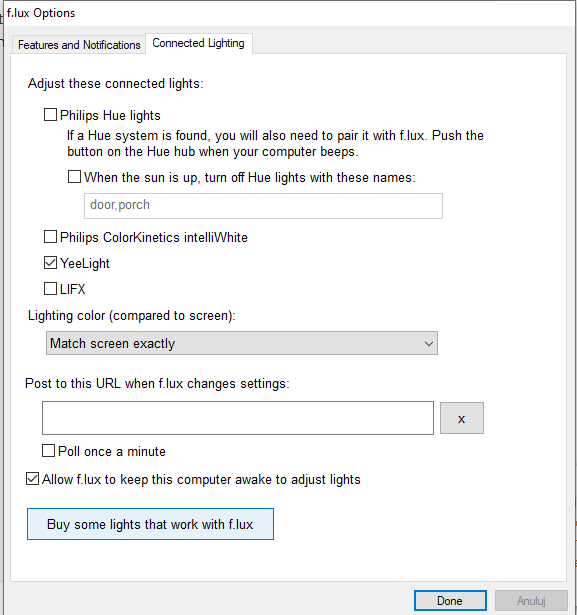
Hello! It looks like you're interested in this conversation, but you don't have an account yet.
Getting fed up of having to scroll through the same posts each visit? When you register for an account, you'll always come back to exactly where you were before, and choose to be notified of new replies (either via email, or push notification). You'll also be able to save bookmarks and upvote posts to show your appreciation to other community members.
With your input, this post could be even better 💗
Register Login