f.lux f.lux forum
    • Recent
    • Popular
    • Register
    • Login

    Version 3 to 4 Upgrade

    Scheduled Pinned Locked Moved Windows v4
    77 Posts 26 Posters 153.7k Views 28 Watching
    Loading More Posts
    • Oldest to Newest
    • Newest to Oldest
    • Most Votes
    Reply
    • Reply as topic
    Log in to reply
    This topic has been deleted. Only users with topic management privileges can see it.
    • TwoCablesT
      TwoCables
      last edited by TwoCables

      I really enjoyed knowing which version I have by just right-clicking the icon in the Notification Area. I think there's nothing wrong with keeping the version number there. I can agree though that it's better to say "Exit f.lux" instead of "Exit f.lux 4.48".

      1 Reply Last reply
      Reply Quote 0
      • B
        Bushido
        last edited by

        Hello,

        In version 3, I liked that when holding the mouse on the f.lux taskbar icon, then a tooltip informed be about the sunset time. In version 4, the tooltip has only a message „fl.lux". Now I have to make extra click in order to see the previously mentioned information.
        Any ways to get the V3 behaviour back?

        herfH 1 Reply Last reply
        Reply Quote 0
        • herfH
          herf @Bushido
          last edited by

          @Bushido yes it was no fun to take this out - it was causing problems with Windows "notifications" settings.... tons of dupicate entries. Hopefully we can figure out how to put it back.

          1 Reply Last reply
          Reply Quote 2
          • TwoCablesT
            TwoCables
            last edited by TwoCables

            I think "Getting sleepy?" could be changed to "F.lux is in Bedtime mode" (or something similar). So, I think it would be good for f.lux to report which mode its in instead of having a conversation with its user.

            1 Reply Last reply
            Reply Quote 2
            • Nahtanoj Tarp-AicragN
              Nahtanoj Tarp-Aicrag
              last edited by

              Hi,
              I took some time to adjust to v4 changes before posting. I'm quite happy with it now (wasn't at first :)).
              One thing i don't like is the lack of 1-click access (or hotkey) to my most commonly used options : Movie mode / darkroom mode / Vignette mode.
              The other "color effects" seem pretty useless to me, and I even read somewhere on the forum that they are considered "demo effects". So why create a sub-category for demos and hide useful options in there ?

              One more word : Vignette mode is amazing, thank you !
              It would be even better if it could detect where the text is and adjust accordingly, but it's already great.

              J B 2 Replies Last reply
              Reply Quote 1
              • A
                alexncfc
                last edited by

                If I set the drop-down box on the right in v4.47 to "Classic f.lux", should it be the same as how it used to look (by default) in version 3(.12)? It's just that I updated to 4.47 a few days ago and something seems very different about my screen now when the sun sets compared to what it used to be like in the previous version.

                Finding it all a bit confusing if I'm honest!

                1 Reply Last reply
                Reply Quote 0
                • herfH
                  herf
                  last edited by

                  Here are two things that may have changed:

                  1. We are doing a slow transition by default - if you prefer the old one you can select it in the options menu under transition speed (=medium)

                  2. We are trying to match your monitor color more closely, but occasionally a monitor isn't cooperating. Again in the options menu, you can try unchecking "Use display data for better color accuracy"

                  1 Reply Last reply
                  Reply Quote 0
                  • A
                    Ady1989
                    last edited by

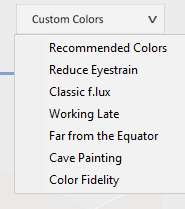
                    Hello. I have a question regarding the new version of f.lux. On the old version, I used to use the color effect "reduce eyestrain". But now, I cannot find it anymore. How can I obtain the same effect? Thank you.

                    B 1 Reply Last reply
                    Reply Quote 0
                    • B
                      Bushido @Ady1989
                      last edited by

                      @Ady1989 0_1508231525361_upload-acfdb7a4-d4b4-4240-b358-9d8f001aee30 Click f.lux icon and then the drop-down menu on the upper right side.

                      A 1 Reply Last reply
                      Reply Quote 0
                      • A
                        Ady1989 @Bushido
                        last edited by

                        @Bushido thank you. But, it will have the same effect, it will so the same thing? The "reduce eyestrain" effect used to change the color of my screen during the day. The one from that menu will do the same?

                        B 1 Reply Last reply
                        Reply Quote 0
                        • B
                          Bushido @Ady1989
                          last edited by

                          This post is deleted!
                          A 1 Reply Last reply
                          Reply Quote 0
                          • A
                            Ady1989 @Bushido
                            last edited by

                            @Bushido I don't think it has the same effect. The current one will stay permanently at 5900K. The previous one used to change this step by step, according to the sunlight. I don't want the color change that the program makes automatically. Maybe someone from f.lux may have a concrete answer.

                            1 Reply Last reply
                            Reply Quote 0
                            • TwoCablesT
                              TwoCables
                              last edited by TwoCables

                              It was renamed to "Soft White" because people were confused by having 2 settings of the same name that did 2 completely different things.

                              A 1 Reply Last reply
                              Reply Quote 0
                              • A
                                Ady1989 @TwoCables
                                last edited by

                                @TwoCables thank you. I will select the "soft white" effect and check during the dat if it has the same effect as the "reduce eyestrain" use to have. So the reduce eyestrain from the right menu what does it do?

                                TwoCablesT 1 Reply Last reply
                                Reply Quote 0
                                • TwoCablesT
                                  TwoCables @Ady1989
                                  last edited by

                                  @Ady1989 said in Version 3 to 4 Upgrade:

                                  @TwoCables thank you. I will select the "soft white" effect and check during the dat if it has the same effect as the "reduce eyestrain" use to have. So the reduce eyestrain from the right menu what does it do?

                                  Choosing "Soft White" changes the color immediately. It is the new name of the Color Effect called "Reduce Eyestrain". What it does has not changed.

                                  The menu he showed you is color temperature presets for Daytime, Nighttime and Bedtime mode. Play around with f.lux a little. ;)

                                  1 Reply Last reply
                                  Reply Quote 0
                                  • Sara PreliseS
                                    Sara Prelise
                                    last edited by

                                    Is it possible to change the hotkey for disabling flux? "alt+end" - my laptop doesn't have an end key -___-

                                    B 1 Reply Last reply
                                    Reply Quote 0
                                    • B
                                      Bushido @Sara Prelise
                                      last edited by

                                      @Sara-Prelise No, it is not possible. E-mailing to the developers of f.lux (support@justgetflux.com) might help to expand the variety of hotkeys.

                                      1 Reply Last reply
                                      Reply Quote 0
                                      • S
                                        seraphim
                                        last edited by

                                        With the new upgrade, all my screen shots are "dimmed", and people see the dimming effects when I am sharing my screen over Skype.

                                        This never happened with the older version.

                                        Can I turn this off?

                                        herfH 2 Replies Last reply
                                        Reply Quote 1
                                        • herfH
                                          herf @seraphim
                                          last edited by

                                          @seraphim Usually the best thing to do is reboot. We are emulating effects in the GPU until you login again.

                                          S 1 Reply Last reply
                                          Reply Quote 0
                                          • herfH
                                            herf @seraphim
                                            last edited by

                                            @seraphim Also how do you usually take screenshots? We have been considering a way for f.lux to disable automatically (very fast) for this, but it basically only works if we are the only app looking for the PrtScn key, which isn't always the case.


                                            1 Reply Last reply
                                            Reply Quote 0

                                            Hello! It looks like you're interested in this conversation, but you don't have an account yet.

                                            Getting fed up of having to scroll through the same posts each visit? When you register for an account, you'll always come back to exactly where you were before, and choose to be notified of new replies (either via email, or push notification). You'll also be able to save bookmarks and upvote posts to show your appreciation to other community members.

                                            With your input, this post could be even better 💗

                                            Register Login
                                            • First post
                                              Last post
                                            Copyright © 2014 NodeBB Forums | Contributors